Glassine app icon: a photograph protected by a translucent sleeve

Versioned backup for iCloud Photos

Deleted does notmean gone.

Glassine keeps a verified history of your photo library on a drive you control, including photos deleted from iCloud and every version of every edit.

Coming soon · 30-day trial · one-time purchase · macOS 14 or later

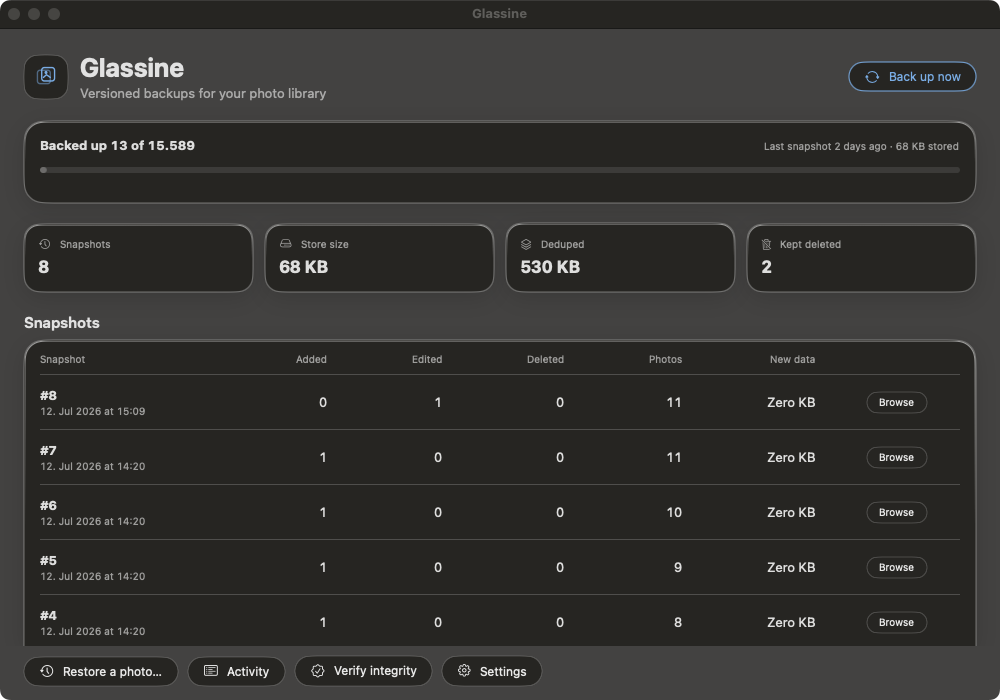
Glassine dashboard showing backup progress, snapshot history, storage statistics, and restore controls
The guarantee
Completely read-only toward your library and iCloud.

Glassine never modifies, moves, or deletes anything in Photos or iCloud, and never uploads anything. It only copies originals out into a backup that belongs to you.

The single exception is the explicit “Restore to library” button. It only adds a new photo back. Nothing else in Glassine can write to your library.

Time travel

Your library,
as it was.

Every completed backup becomes a snapshot. Scrub back through time, browse the whole library at that moment, and recover any photo or any older version of an edit.

Every snapshot stays browsableUntil your chosen retention policy thins it.
Deleted photos stay protectedForever by default, independent of snapshot retention.
Every edit has a historyRestore the photo as it looked before the crop.
Library timeline18 July 2026 · 14:20
Today1 month6 months1 year
Deleted
Deleted

Built for trust

A backup that
shows its work.

Glassine is designed around the failure cases: interrupted downloads, silent corruption, missing drives, and the photo you only notice is gone a year later.

SHA-256every original
Monthlyscheduled scrub

Verified on every read.

A file’s name is its checksum. Restore, export, and verification re-hash every byte and refuse to hand over corrupted data silently. Scheduled scrubbing can re-queue damaged originals while they still exist in iCloud.

9e107d9d372bb6826bd81d3542a419d6
blobs/9e/10/9e107d9d...

Full once.
Incremental after.

The first backup walks the library. After that, PhotoKit’s persistent change token limits work to what changed. Interrupted iCloud downloads resume automatically.

Atomic by construction.

New blobs are written to a temporary location and renamed into place only when complete. A crash cannot leave a half-written file pretending to be a photo.

Stored once.

Content-addressed storage means identical bytes are kept once, however many snapshots reference them. Stable libraries gain history without multiplying storage.

one original · many snapshots

Open forever

No lock-in.
Provably.

Your backup is a standard SQLite index plus plain files. Every store carries recovery instructions that use tools already built into macOS.

You never need Glassine to get your photos back.

Read the full recovery note

# Every store includes RECOVERY.txt
mkdir -p ~/recovered
sqlite3 index.sqlite \
  "SELECT hash, original_filename
   FROM resource_version" |
while read hash name; do
  cp "blobs/${hash:0:2}/${hash:2:2}/$hash" \
     ~/recovered/"$name"
done

# Plain files. Standard database. Your backup.

Archive, not mirror

A copy protects the library.
An archive protects the past.

Ordinary copy

Deletion is copiedA mirror eventually reflects the missing photo.
History costs full copiesOr the old state is simply overwritten.
Corruption may stay silentOften discovered only when the file is needed.

Glassine archive

Deleted photos are protectedBadged, browsable, and kept forever by default.
History is content-efficientUnchanged originals are stored once.
Every read is verifiedSilent corruption is refused, not passed through.

Private by absence

No server.
No account.
No telemetry.

Nothing ever leaves your machine. Glassine has no analytics, no crash uploads, and nowhere to send your library. This website is static, sets no cookies, and loads no third-party scripts.

Questions

The details matter.

Can Glassine damage my library?

No. It reads through Apple’s PhotoKit API and is completely read-only toward your library and iCloud. The only write path is the explicit “Restore to library” action, which only adds a new asset.

What happens to a deleted photo?

A missing photo first enters a grace period, so a sync hiccup does not create a false deletion. Once confirmed, its stored pixels are protected independently of snapshot retention and kept forever by default.

Why can the first backup take a while?

With “Optimize Mac Storage,” many originals exist only in iCloud and must be fetched once. Glassine downloads on configurable parallel lanes, resumes interruptions automatically, and later backups process only changes.

Where can I keep the backup?

Any folder you choose. An external drive or NAS is safest. A store is claimed by one Mac for writing, but browsing, verification, export, and recovery work from any Mac.

What does “verified” mean?

Each original is addressed by its SHA-256 hash. Every restore, export, and scrub recalculates that fingerprint and refuses to return bytes that do not match.

Menu bar icon missing on a MacBook with a notch?

macOS hides menu bar icons that don’t fit next to the notch — silently, for every app, and Apple gives apps no way to detect or avoid it. ⌘-drag the Glassine icon toward the clock (rightmost items survive crowding; the position sticks), or use a menu bar manager. Nothing is lost meanwhile: everything in the menu is also in the main window.

Can I recover after replacing my Mac?

Yes. Reads are deliberately device-agnostic. Browse, restore, export, and verify the store from another Mac, even though only the original Mac may continue writing backups into it.


Keep the past
within reach.

Versioned, verified backup for your iCloud photo library, stored on a drive you control.

Download on the Mac App StoreDownload on the Mac App Store

Coming soon · 30-day trial · one-time purchase · macOS 14 or later